

The All Subscriptions view is the power-user tool for the shop. Instead of opening one customer at a time, you see every active subscription across your entire customer base, grouped by title. This is the right place to work when a series is ending and a new one is starting, or when you want to identify every customer subscribed to a specific title.
Finding the All Subscriptions View
Navigate to Customers → All Subscriptions (or All Subscriptions in the customer submenu on Oryx).
In Oryx multi-location shops, use the location dropdown to filter by a single store or choose All Locations to see everything.
What You See
Every active subscription in your system, organized by title. Click any title to open its dedicated page, where you can:
See every customer subscribed to the title, with their cover choice (A or B).
Edit or delete individual subscriptions.
Add new customers to the title.
Clone customers from or into another title.
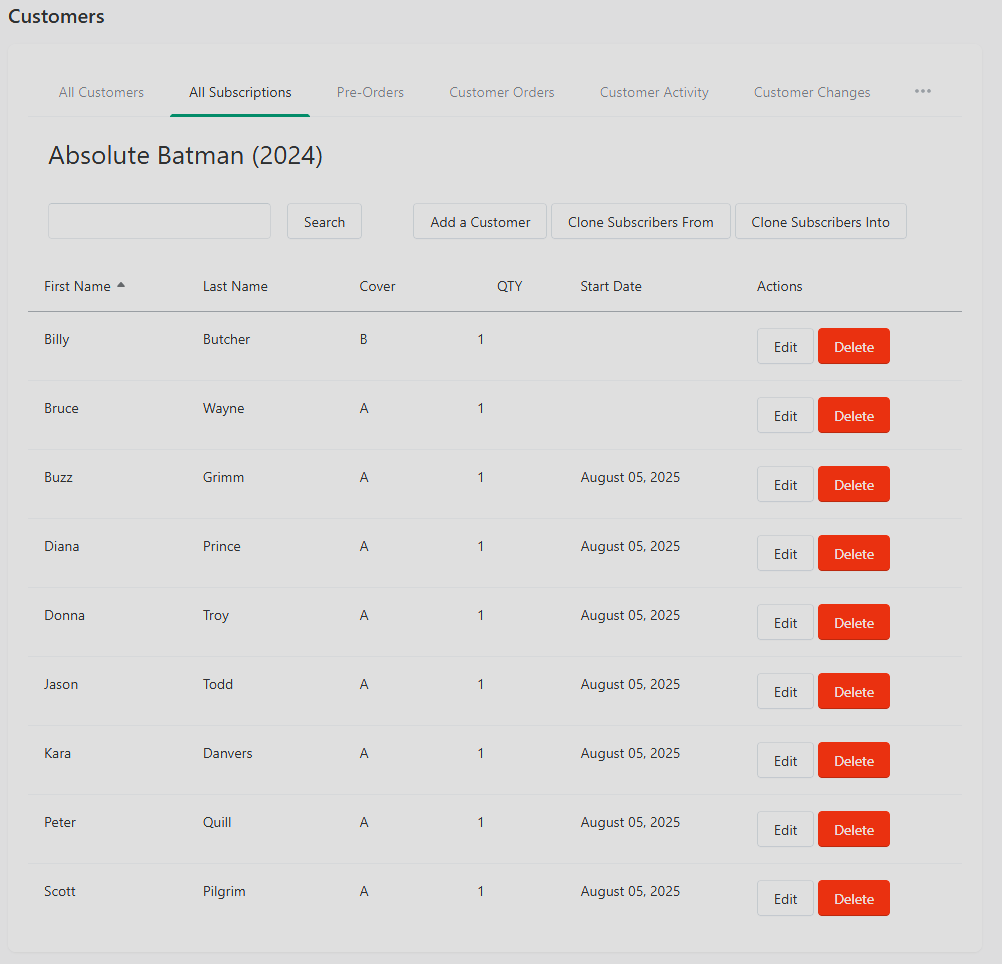
Cloning Subscriptions — The Feature That Earns Its Keep
Cloning is the capability that makes All Subscriptions worth learning. When a series ends and a sequel launches, you can clone every subscriber from the old title onto the new one in a single action.
Example: Phenomenal Platypus is wrapping up. Uncanny Platyplodes is launching next month. Instead of editing 200 customer pull lists one at a time:
Open the Uncanny Platyplodes title page inside All Subscriptions.
Use the Clone Actions menu to clone customers FROM another series (select Phenomenal Platypus).
Every subscriber from the old title is now also subscribed to the new one.
You can also clone INTO another title — useful when you want to take a thriving sub list and use it as a seed for a related launch.
Duplicate protection: if a customer is already subscribed to the target title, cloning won't double them up. They're simply skipped.
Limitations
Cloning currently works only for subscribable products (ongoing series). One-shots and non-subscribable products aren't supported — a fix is on the roadmap.
Changes are immediate. There is no "undo" on a clone. If you clone 400 customers onto the wrong title, you're removing them one-by-one to reverse it.
Search and Filtering
Use the search bar to find a specific title by name. Partial matches work — "platyp" will find both series above.
If a search returns nothing, try a shorter piece of the title.
Troubleshooting
Can't see all subscriptions. Check the location filter — in multi-location shops, the view may be scoped to a single location.
Edit button not working. Confirm your user has edit permissions and reload the page.