

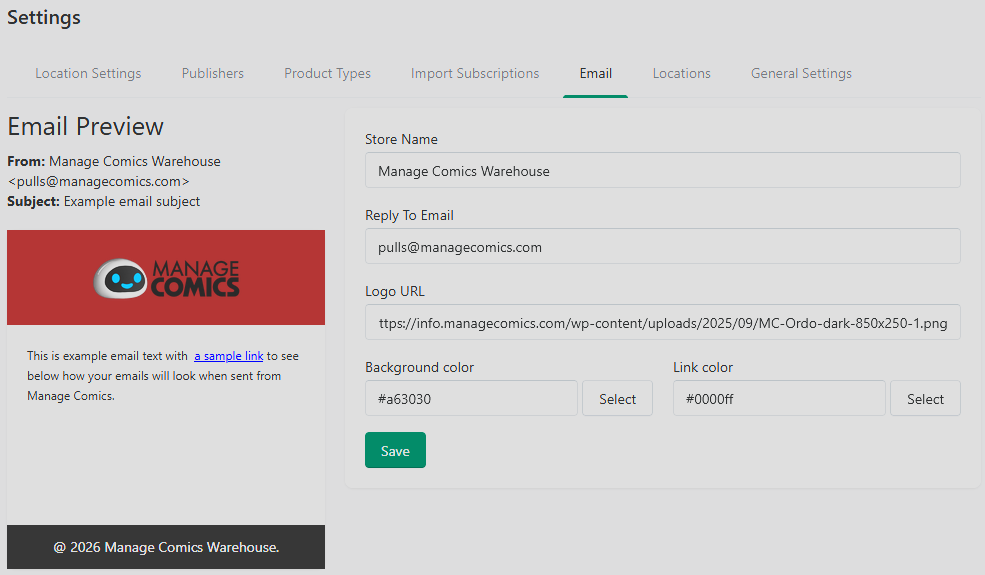
Email Settings is a small configuration screen, but it controls something customer-facing: the From address and Reply-To address on every email your shop sends through Manage Comics. Setting these correctly — to an address you actively monitor — is the difference between customer replies landing in your inbox and disappearing into a no-reply void.
Where to Find It
Ordo: Apps → Manage Comics → Settings → Email.
Oryx: Settings → Email.
What You Can Configure
From Name — the human-readable name customers see in their inbox (typically your shop name).
Reply-To Email — the email address campaigns come from. For best deliverability, use an address at your shop's own domain (
pulls@yourshop.com) rather than a generic Gmail.Logo URL — Link the URL of your store's logo to add it to your email header.
Background Color — Modify the color of the email header.
Link Color — Customize the hyperlink color in your emails.
Deliverability Tips
Using an address at your own domain (rather than
yourshop@gmail.com) reduces the chance of emails landing in spam.If you own a domain, add SPF, DKIM, and DMARC records to authorize Manage Comics to send on your behalf. Your domain host's support docs cover this — it's a one-time setup that pays off for the lifetime of the shop.
Avoid switching the From address frequently. A stable sender address builds reputation with receiving mail providers over time.
Testing
Send yourself a test campaign after any email-settings change:
Create a short General campaign.
Send it.
Check that it arrives at your own inbox with the correct From name and address.
Reply to the email and confirm the reply lands at your Reply-To address.
Ordo Note
On Ordo, transactional Shopify emails (order confirmations, invoice emails) are sent by Shopify, not Manage Comics, and use Shopify's sender settings. To adjust those, go to Settings → Notifications in Shopify admin.