

An initial order is the first quantity you commit to a distributor for a given solicited title, typically a month or more before the book actually ships. It's your shop's guess at how many copies you'll want on the shelf, built from your customer pulls plus your shelf-order buffer.
Initial orders matter for two reasons: (1) they're usually locked in at a better discount than reorders, and (2) they're the only chance to commit to low-print-run variants and exclusive covers before they sell out at the distributor.
The Initial Order Cycle
Every month, distributors publish a Previews catalog listing titles on sale about two months out. Your shop reviews Previews, decides quantities for each title, and submits an initial order back to the distributor. That initial order is locked in and then later adjusted at FOC (Final Order Cutoff) — which is covered separately.
Manage Comics calculates a suggested initial order quantity for every title based on your customer pulls and your shelf history. You review, adjust, and submit.
Where Initial Orders Live in Manage Comics
Ordo: Apps → Manage Comics → Ordering → Initial Orders.
Oryx: Ordering → Initial Orders.
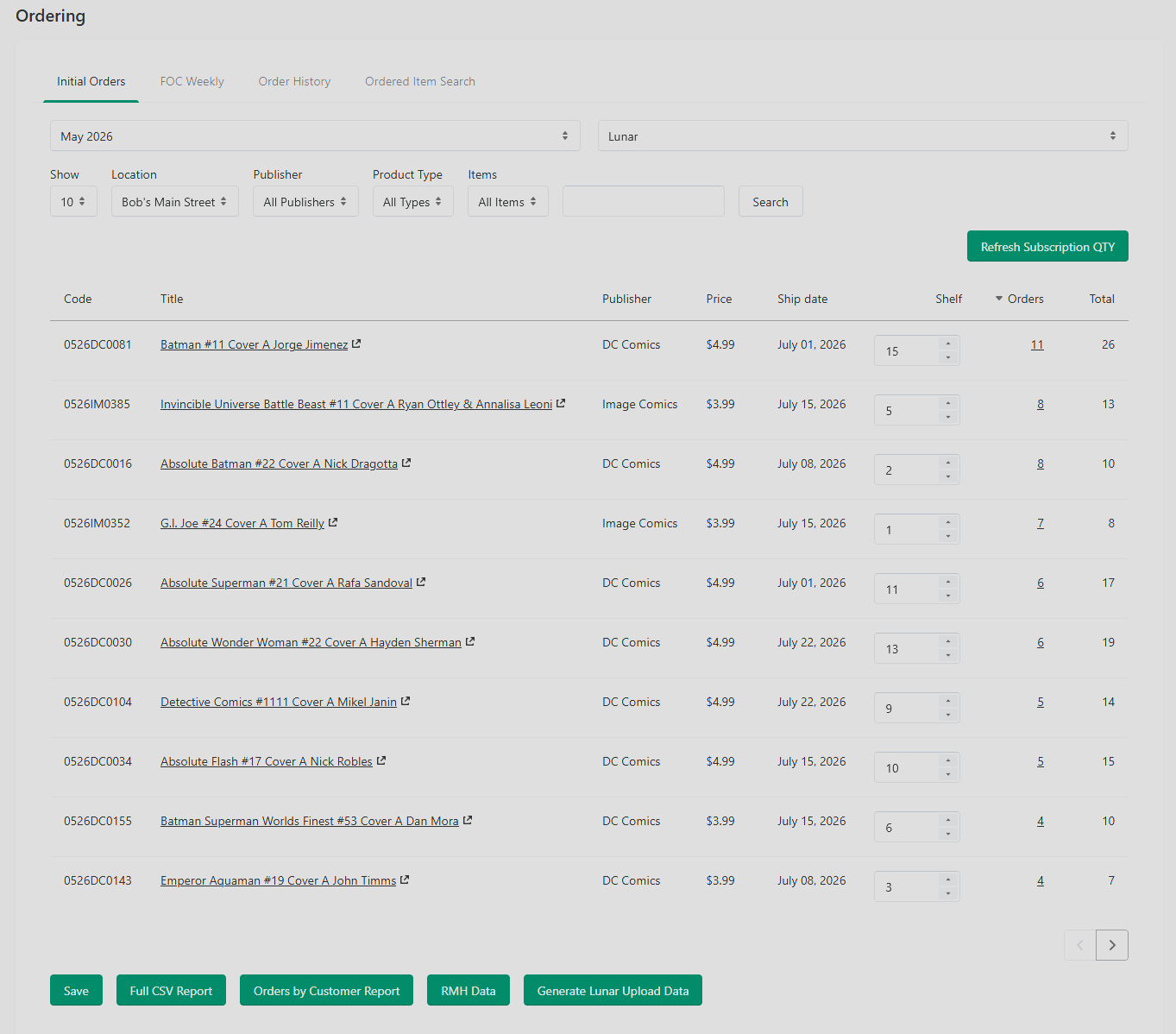
Both open to the same structure: a list of titles currently open for initial ordering, with columns for book information, price, ship dates, shelf copies, customer order quantity and total.
Reviewing and Adjusting Quantities
For each title in the list:
Review the suggested quantity. Manage Comics bases this on the number of customer pulls on the series plus a shelf buffer.
Adjust as needed. Most shops round up on hot titles and down on fading ones.
Items can be sorted by Publisher, Product Type and either items with Shelf Copies, Orders, any quantity at all or New Series.
Submitting Initial Orders to the Distributor
Manage Comics generates a distributor-ready file from your committed initial order. Export paths:
Lunar: See Monthly Task — Lunar Initial Order Upload.
PRH and Universal: Distributor-specific paths documented in their respective articles.
Initial Order cutoff at most distributors is roughly three weeks before FOC. Don't wait until the last day — if the export file has a validation error, you want time to fix it.
Initial Order vs. Final Order Cutoff (FOC)
It's worth being clear on the difference:
Initial Order: Your first commitment, placed about 2 months before the book ships. Often gets the best discount and is the only way to lock in certain variants.
Final Order Cutoff (FOC): Your last chance to adjust quantities, typically 3-4 weeks before the book ships. You can go up or down, but at FOC you're fighting for allocation against everyone else who's also adjusting.
Most shops treat the Initial Order as "here's my best guess" and FOC as "here's what I actually need now that I see how customer interest landed." Manage Comics tracks both numbers side-by-side so you always know the gap between the two.
Held-Back Products and Initial Orders
Some shops hold back a portion of every initial order for shelf stock rather than allocating 100% of the initial quantity to pulls. See Held Back Products for how to configure this behavior.
Reviewing After Submission
After you submit an initial order, it moves from "open" to "submitted" in Manage Comics. Submitted orders are read-only. If the distributor rejects or modifies the order, update the line manually to reflect what was actually accepted — this keeps your projections accurate when FOC rolls around.