

The Customer Detail view is the single screen that contains everything about one customer: their header info, their active subscriptions, their pending pre-orders, and their inactive history.
Any time you're handling a specific customer's request — a pull list change, a note about bagging preferences, a disable — you're spending time here.
What You See
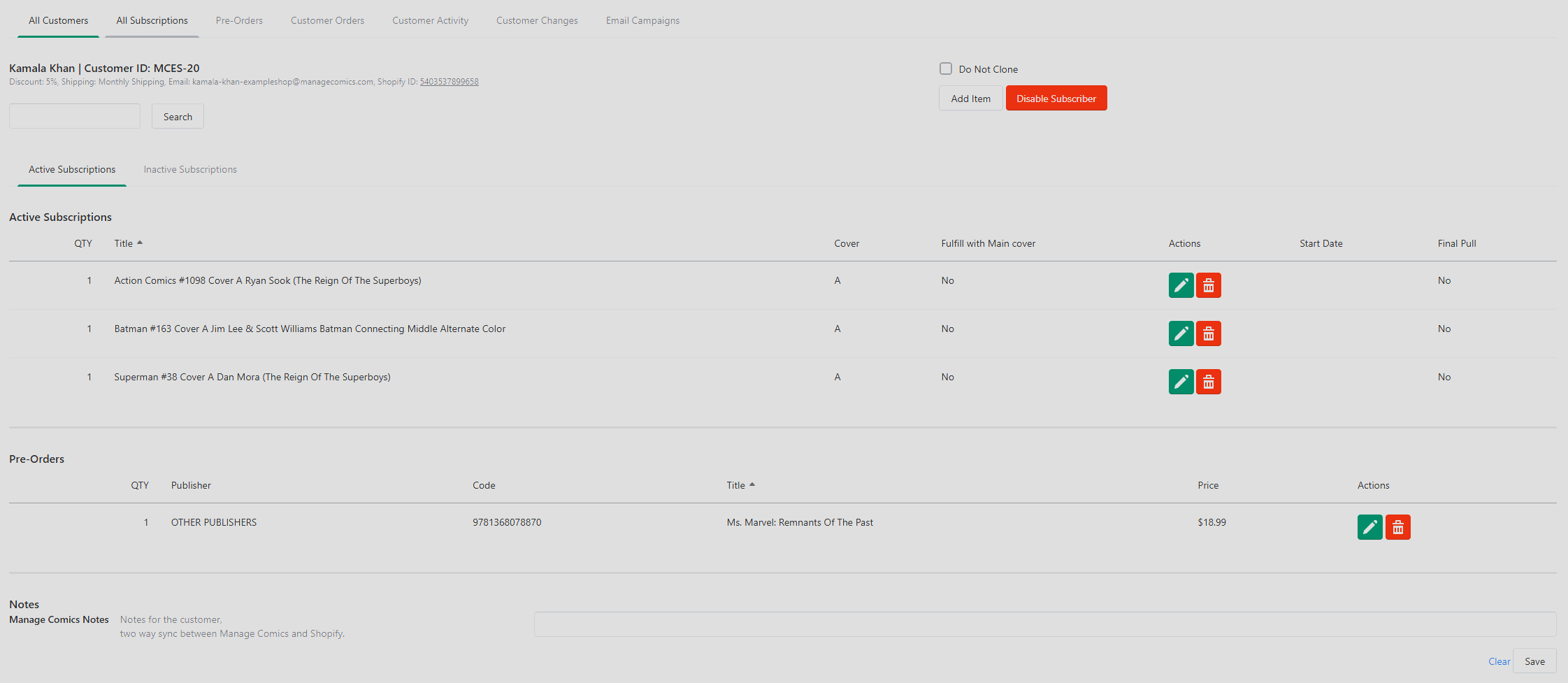
The detail view splits into sections:
Customer header — name, email, phone, custom Subscriber ID, discount, shipping type, notes.
Active Subscriptions — currently active series subs. For each, you can edit (cover, start date, quantity, Final Pull), delete immediately, or mark as a Final Pull.
Pre-Orders — currently active and unfulfilled pre-orders.
Inactive Subscriptions — subs that have ended, either by you, by the customer, or because the series has gone inactive.
Action Buttons
Search — searches within this customer's own subs and pre-orders.
Disable Subscriber — deactivates the customer and prevents them from signing up again with the same account.
Add Item — opens the subscription/pre-order search so you can add new items.
Customer Notes
Special instructions for this customer live here. Common notes include:
"Bag and board all issues"
"Add any Batman to their pull automatically"
"Holds until end of month, bills monthly"
Ordo: notes sync to Shopify and appear under Metafields → Manage Comics Notes on the customer's Shopify record. They appear in the Manage Comics customer view immediately after the pre-ordered items.
Editable Fields — Oryx Enhancements
Oryx's customer detail view adds a few fields Ordo doesn't have directly (because Ordo pulls them from Shopify):
Direct edit of first name, last name, email, phone.
Location assignment (multi-location Oryx shops).
Publisher and product-type filters when searching for items to add.
A Covers Only toggle to restrict search to A covers.
Include Past FOC toggle to search older series.
Editing a Subscription Inline
For any line in Active Subscriptions, click the edit icon to:
Switch between Cover A and Cover B.
Set a custom start date.
Change quantity.
Mark as Final Pull (see Edit a Customer's Subscriptions for when to use this).
Troubleshooting
Can't find a specific comic title when searching to add. Try the A Covers Only filter and enable Include Past FOC for older series.
Customer exports missing info. In Oryx multi-location, verify you're exporting from the correct location filter.
Edit Customer modal won't open. Ensure you're clicking Edit Customer on the customer's individual row, not just the name.