

Use this workflow when you want a batch of products available on the POS but hidden from your online storefront. Shopify's Bulk Editor handles this through the Available to Online Store field.
Before you start
Make sure you are applying a new-release tag at check-in, such as new-release-2021-11-04. Tagging makes the products easy to find as a batch.
How to remove products from the web
In Shopify admin, go to Products → All Products.
In the Tagged with field, enter the tag for the batch you want to hide, for example
new-release-2021-11-04.Click Select all 50+ products in your store, or check individual boxes for a subset.
Click Edit products.
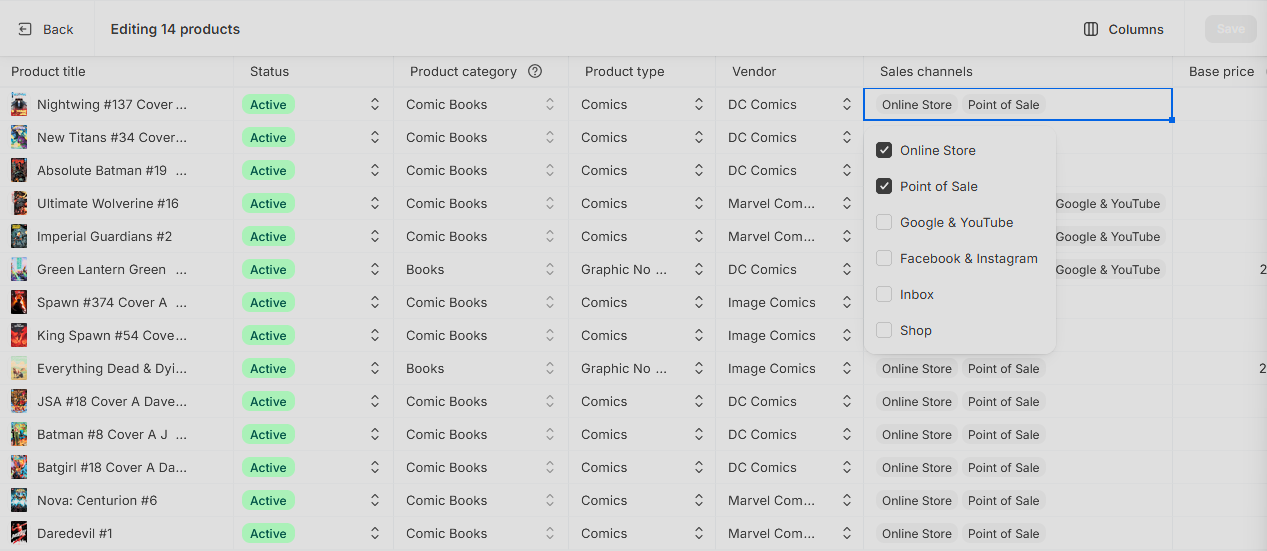
In the Bulk Editor, click Columns and add the Sales channels column.
Click the Sales channels of each product.
Uncheck Online Store.
Click Save at the top of the page.
If your filter spans multiple pages, go to the next page and repeat.
To put products back on the web
Re-check the Online Store boxes in the Sales channels column the same way and save.
Things to keep in mind
Products unpublished from the Online Store are still visible to subscribed customers in their Manage Comics area. Subscription visibility is driven by subscription records, not by web publish status. To fully hide a title from a subscriber, manage it in Manage Comics.