

Barcodes are how Manage Comics matches products to invoice lines during check-in. A wrong or missing barcode can cause an item to fail to match or to be credited against the wrong product. The Shopify Bulk Editor is the right tool for fixing or backfilling barcodes.
How to bulk edit barcodes
Go to Products. Narrow the list with a filter (Vendor, Tag, or Product Type) to find the products you want to edit. For example, More filters → Graphic Novels.
Select the products and click Edit products.
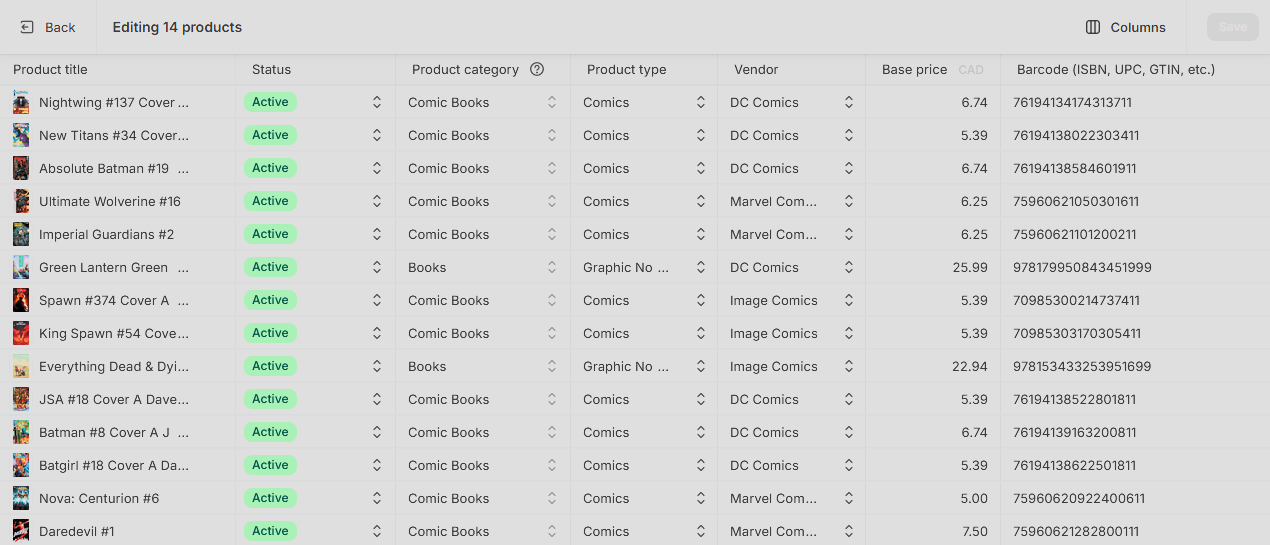
In the Bulk Editor, click Add fields and select Barcode.
Make your changes in the Barcode column.
Click Save. The save takes a few seconds while Shopify updates each product.
Things to keep in mind
If you are pasting from a spreadsheet, make sure the barcode column was formatted as text first. Otherwise leading zeros may be stripped. See How to Safely Open a CSV in Excel.
The barcode used for matching during check-in is the UPC. SKUs and product IDs will not match.
Large bulk changes take time to apply. Wait for the save indicator to clear before navigating away.