

Use Subscribed Product Shortages to see which customers are still owed a copy of a subscribed product.
This section gives you a more detailed shortage report, broken down week by week and by distributor. It is especially useful when you need to know who is still waiting on a book and what will need to be fulfilled once replacement stock arrives.
Where to Find It
Reports → Subscribed Product Shortages.
If you have multiple locations, use the location dropdown to scope to one store or All Locations.
Shortages Fulfill Automatically
The most important thing to know: you don't have to manually track who's owed what. Manage Comics keeps a record of every subscriber affected by a shortage, and the next time you check in stock of that product, it automatically pulls copies for the people who were short. This report is your visibility into that backlog — not a to-do list you have to clear by hand.
How to Use It
Check after each check-in to see who's currently owed a copy.
For an urgent customer, you can swap in a copy from shelf or held-back stock rather than waiting for the next shipment.
For customer communication, the report tells you who to proactively notify before they come in expecting a book that isn't there.
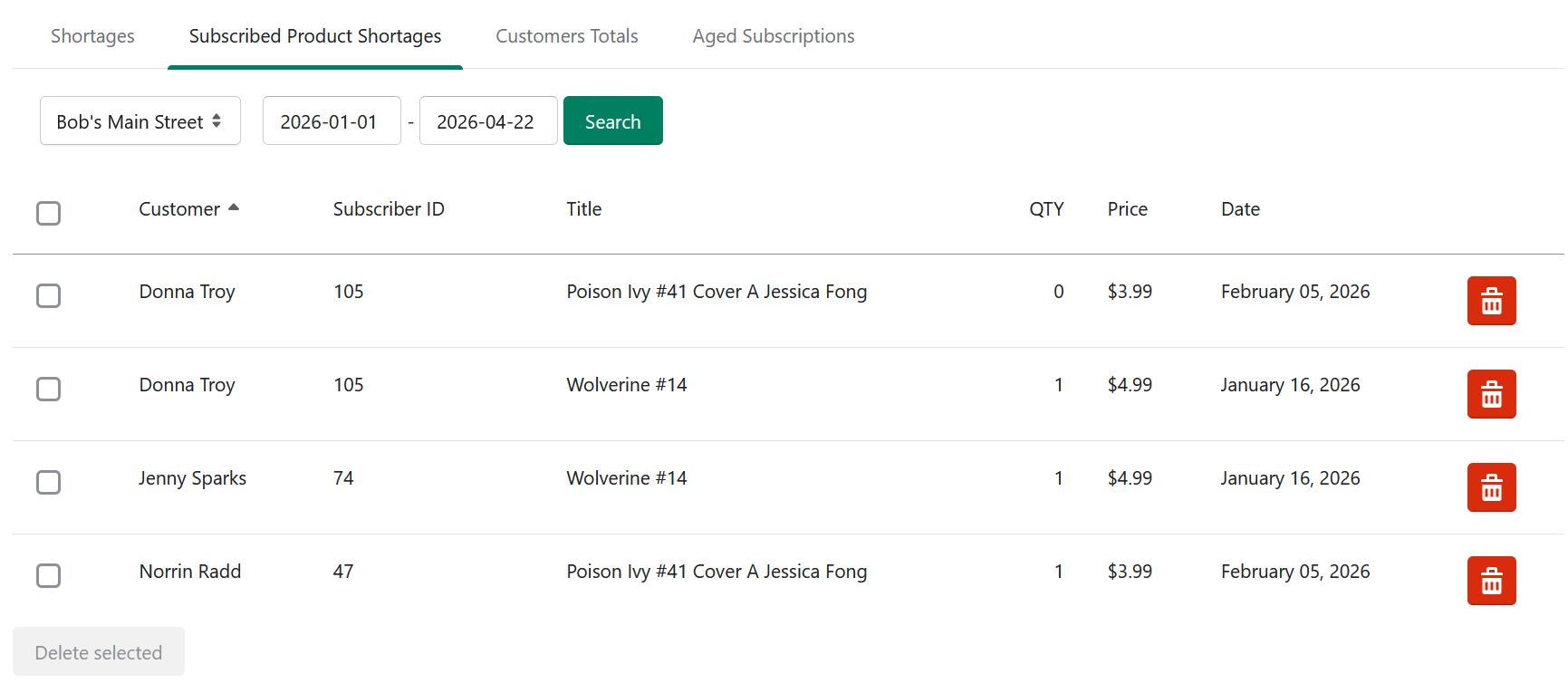
Manage Comics keeps track of who needs what, and will fulfill shortages the next time you check in stock for those products.
Related
Shortages — the aggregate distributor-level view.
Held Back Products — a strategy for reducing subscribed-product shortages.
Edit a Customer's Subscriptions — where you can adjust affected subs directly.