

Reserved Products Adjustments is the manual lever for correcting a title's reserve count after check-in — moving copies between Reserved and Available, fixing miscounts, or absorbing damaged-copy replacements without going through a full order flow. It's a small utility, but a useful one when you need to reconcile inventory without disrupting customer orders.
Where to Find It
Ordo: Apps → Manage Comics → Products → Reserved Products.
What You See
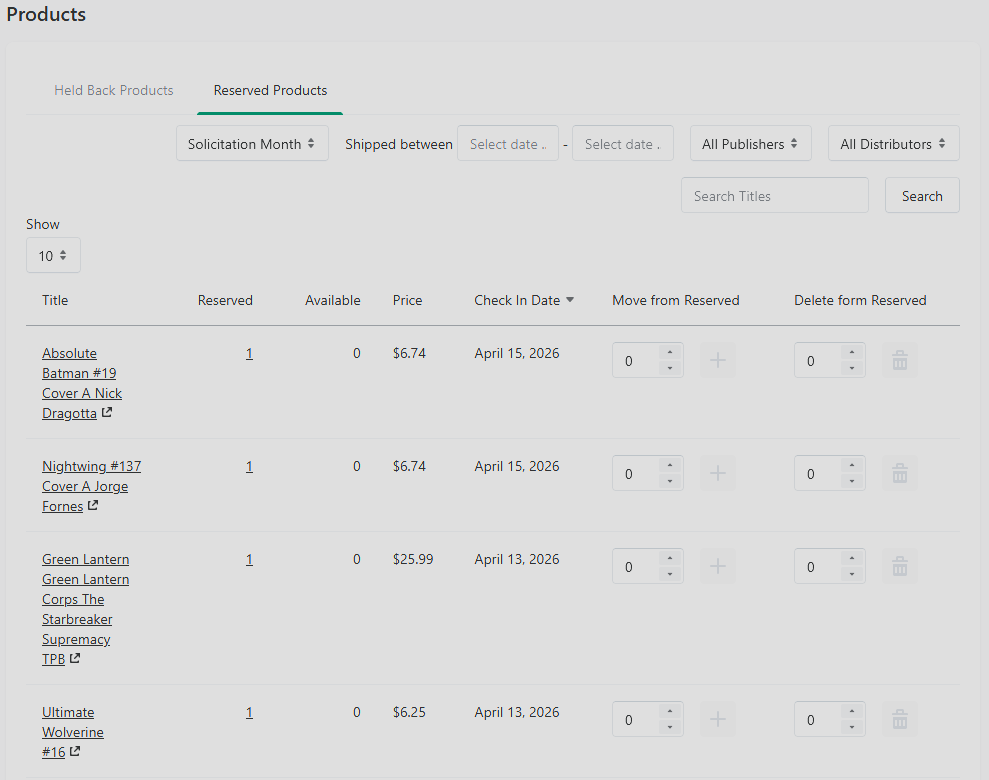
A list of every title currently holding reserved quantity. For each title:
Reserved QTY — copies committed to customer orders.
Available QTY — copies on the shelf and available for sale.
Check In Date — the date the books were pulled.
The Reserved list can be sorted by solicitation month, shipment date, publishers and distributors. All books that are currently being held for subscribers are shown here.
When to Adjust
The most common cases:
A customer picked up a book that wasn't processed through a Manage Comics order — maybe the register rang it up directly. You need to move a copy from Reserved to... well, neither, since it's gone. Use this screen to remove it from Reserved and then zero out the Total if appropriate.
Post-check-in miscounts. You discover a discrepancy after the pull summary is already saved. Adjust here rather than re-running check-in.
How to Adjust
Find the title in the list (search by title or UPC).
Click the row to expand or edit.
Adjust the Reserved and Available quantities.
Save.
Manage Comics pushes the updated counts to Shopify (Ordo) the inventory source of truth.
Why MC Reserved Can Go Negative
A negative Reserved number usually traces to the Order Helper: when items are added to a cart, removed, and added again, Shopify sometimes reports the removal more than once, and the reserve count ends up below zero. The stock itself is fine — the counter has drifted, not the comics.
Fix it here: adjust the Reserved bucket back to the true count (physically count the copies being held if you're unsure). If the same product keeps going negative, note which workflow touches it and tell support — repeated drift on one item usually means something upstream is misfiring.
Cautions
These edits bypass the normal order flow. They don't create or modify a customer order — they only change the bucket totals. If a customer's order is affected, you'll also need to adjust their order directly.
Get into the habit of making Reserved Products Adjustments rarely. If you're doing it often, something upstream (check-in, POS behavior) is probably mis-configured.