

When something's not working or you can't figure out how to do something, you have several ways to get unstuck. They're listed here in order of fastest-to-slowest.
1. Check Service Status First
If something isn't working, the first place to check is the Manage Comics status page at status.managecomics.com. It shows the current status of the app and any ongoing incidents. If a known outage is in progress, you don't need to report it — we're already on it.
2. Search This Helpdesk
The search bar at the top of every page searches every article in the knowledge base. If you know what the feature is called — "FOC," "pre-order," "Lunar" — search usually gets you there in one try. This is almost always the fastest option.
3. Email Support
Email our support team at help@managecomics.com or go to the Manage Comics Contact form. Include:
The name of your shop and the product you're on (Ordo or Oryx).
A clear description of what you were trying to do and what happened instead.
A screenshot if the issue is visual.
The URL of the page you were on, if applicable.
Response time is typically under 24 business hours. For urgent issues (something broken during FOC crunch, for example), say so in the subject line.
4. Feature Requests
If what you need isn't a bug but a missing feature, submit it to our public roadmap. You'll find Feature Requests and Road Map links in the top navigation of this helpdesk. Customer-submitted requests are where a meaningful share of our roadmap comes from.
5. Book a Call
For complex issues — migrations, multi-location setup, onboarding a new staff member — a short call is usually faster than back-and-forth email. Reply to any support email and ask to schedule time; we'll send a booking link.
6. Community and self-serve help
Hop into the discord and get verified by posting your store name: managecomics.com/discord.
Join the Facebook group at https://www.facebook.com/groups/managecomics.
Tips That Make Support Faster
Screenshots save time. A single image of the problem usually replaces a full paragraph of description.
If you're reporting a failed import, attach the file. We can't reproduce an import issue without the source data.
Tell us what you already tried. It saves us from suggesting the same thing.
For Ordo issues, mention whether you're seeing the problem in the Shopify admin, on your storefront, or in Shopify POS — the three have different failure modes.
If your request requires someone from our team to access your store, provide us with your
yourstore.myshopify.com.Note that this URL is different from your public facing domain.You can find this by navigating from your Shopify Admin to Settings > Domains.
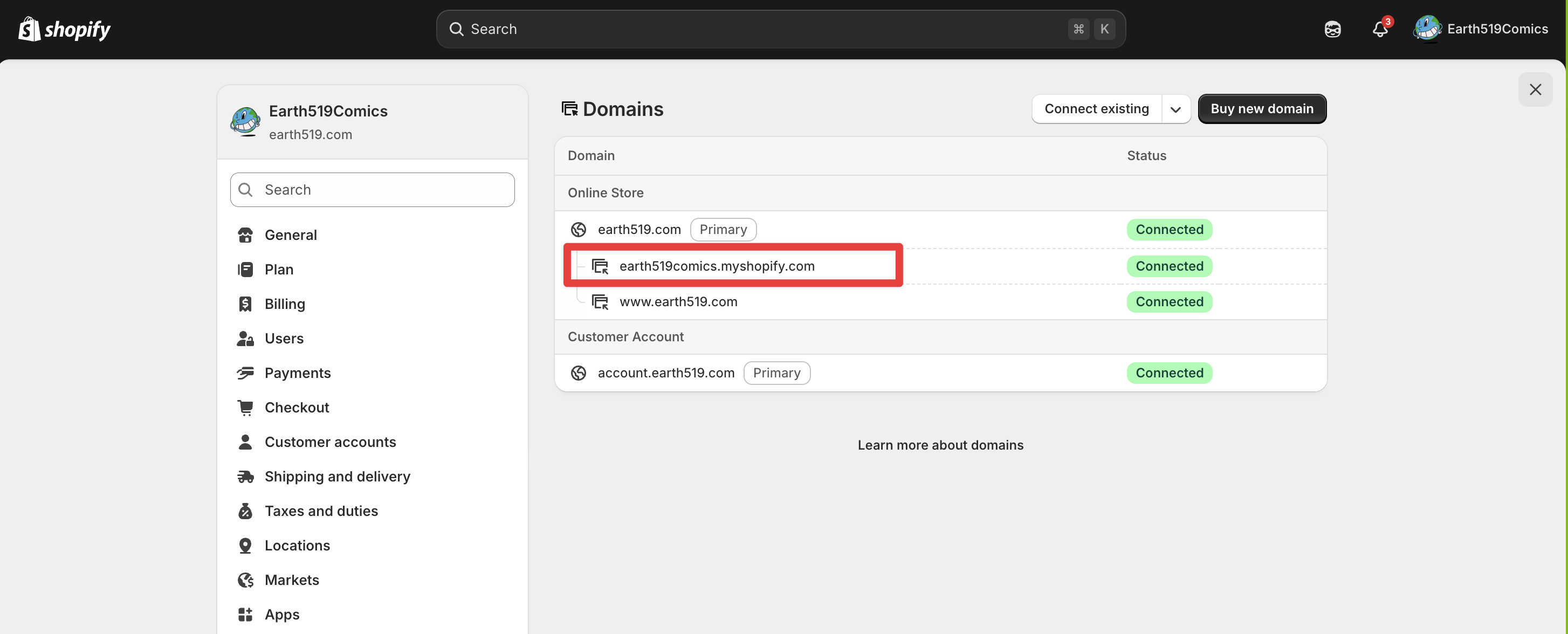
Where to find your .myshopify domain.