

This article covers exporting data from ComicSuite, either to migrate into Oryx or to reconcile between the two systems during a parallel-run period. Once you have your files, send them to us for cleaning, then import them into Oryx — see Importing into Manage Comics.
How to Start
To begin the process, you'll need two key files from ComicSuite: your customer list and your subscription list.
The best way to get your Customer data out of Comic Suite is with a simple SQL dump, but the second best is RMH's customer export.
Step 1 (option a): Export Your Customers
Open Store Manager in RMH.
Navigate to Customers > Export to Excel.
Save the file to your desktop or another easily accessible location.
This will not give you the best results but is a simpler process.
Step 1 (option b): Export Your Customers (RECOMMENDED)
CAUTION: This requires SQL access, if you do not have the ability to open SQL explorer, please talk to your resident Guru, if you need us to Gu Ru For U, please send an email to help@managecomics.com so we can discuss how to proceed.
Open SQL Explorer
Run the following Query (replacing DATABASENAME with the name of your database).
JavaScript/****** Script for EXPORTING ALL CUSTOMERS RM ******/SELECT[AccountNumber], [FirstName], [LastName], [EmailAddress], [PhoneNumber], [Address], [Address2], [City], [State], [Country], [Zip], [AccountBalance], [CreditLimit], [totalsales], [totalvisits], [CurrentDiscount], [pricelevel], [taxexempt], [notes], [vouchers], [limitpurchase], [layawaycustomer]FROM [DATABASENAME].[dbo].[Customer];IMPORTANT: Do not change any of the fields, don't change orders, don't add fields, don't take away fields.
Save as a CSV (with headers if possible).
Proceed to Export your Subscription List
Step 2: Export Your Subscription List
Open Comic Suite.
From the top navigation menu, go to:
Reports > Subscriptions > Master Subscription Summary > By CustomerClick File > Save As and choose CSV format.
Save this file to your desktop or another easy-to-find location.
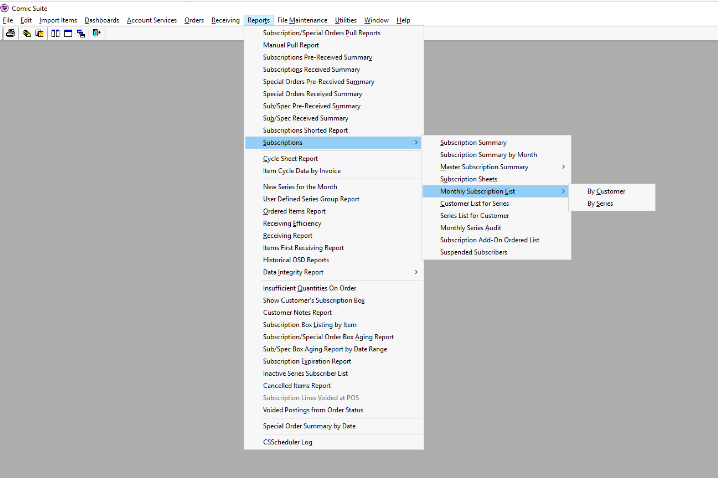
Congratulations! You are done the Export steps.
Your next step is to import your data into Manage Comics Oryx.
Next step: send us your files for cleaning
Email both files to help@managecomics.com with your shop name. You don't need to clean the files yourself — our team deduplicates customer records, normalizes phone numbers, and fixes character encoding, then emails the cleaned files back ready to import. Two things to tell us in your email:
Whether you want inactive customers excluded from the migration.
Anything unusual about your data we should know going in.
Once your cleaned files come back, import them through Settings → Import Customers and Settings → Import Subscriptions in Oryx — the walkthrough is in Importing into Manage Comics.
Parallel-run considerations
If you are running ComicSuite and Oryx in parallel during migration, agree on a single source of truth for each data type:
Subscriptions: almost always moved to Oryx.
In-store sales: stay in ComicSuite until you switch the register.
Inventory: whichever system you are checking in against that week owns the quantity.